Nearly 50 enhancements make our latest release of Minitab even more powerful and easy to use.
Calculator Functions
Access more than 40 new calculator functions, including:
- 23 options for manipulating text.
- Percentiles and the geometric mean.
- Workday, weekend, and holiday designations to calculate elapsed time.
Geometric Distribution
Easily calculate probabilities for the geometric distribution, including the number of trials needed to find the first event, such as a defect.
Negative Binomial Distribution
Easily calculate probabilities for the negative binomial distribution, including the number of trials needed before an event occurs a specific number of times.
Make Patterned Data for Workdays
Take weekends into account when generating a patterned sequence of date values.
Assign Formulas to Columns
Save time by linking formulas to columns the same way you do in Excel.
Expanded Date/Time Formats and Capabilities
- Enter a wider range of date formats, including the entire month name, based on the settings in the Regional and Language Options in your Windows Control Panel.
- Track time to the tenths or thousandths of seconds.
- Calculate elapsed time (duration, delta time) in hours, minutes, or seconds.
New Currency and Percentage Formats
- Display currency and percentage symbols on data in the Data window, on graphs, and output tables.
- Specify both the currency symbol and the negative number indicator.
Undo and redo multiple edits in the Data window
- Improved display of numeric and date/time data that are pasted into Minitab from Excel and other Microsoft Office programs.
- One-click access to sample datasets from the Open Worksheet dialog.
- The option to password protect project files.
- The ability to open and save files in comma-separated values (.CSV) and Microsoft Excel's Spreadsheet XML (.XML) formats, and to open Excel 2007 files (.XLSX).
Line Plot
Compare response patterns for two or more groups, using a simple line plot to look for interactions and a chromatogram to check for consistency in responses.
Probability Distribution Plot
Gain insight into your data by using this new plot to:
- View the shape of a distribution.
- Compare two distributions.
- Display the shapes of a distribution with varying parameters.
- View the area under a distribution curve that corresponds to either a given probability or x value.
Enhanced Individual Value Plot
Easily interpret data patterns using the new option for arranging overlapping points.
Editing
- More color choices
- More information in graph tooltips
- The addition of spectrum colors for contour plots
- New smoothing default for non-DOE contour and surface plots
- New option for stacking order in stacked bar charts
- Easier editing of reference line, percentile line, and pie chart labels
- The ability to easily display or hide multi-level axis labels for several graphs including time series plots and charts
- More options for specifying display attributes (such as bar colors) for charts and boxplots
More File Format Choices for ReportPad™
Copy a large number of graphs into the ReportPad while keeping the size of your project file small.
One- and Two-sample Poisson Rate Tests
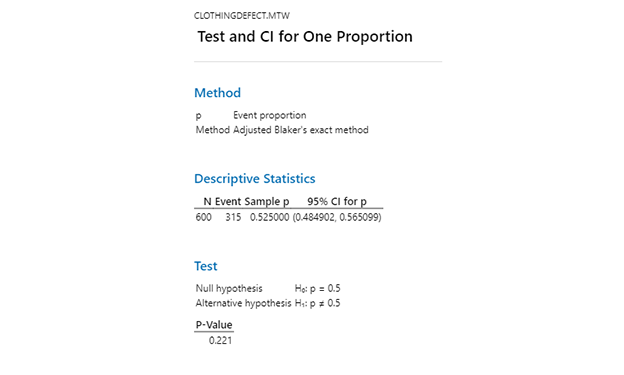
Calculate confidence intervals and conduct one- and two-sample hypothesis tests when your data follow a Poisson distribution.
One-sample Variance Test
- Conduct a hypothesis test to determine whether the population variance equals a specified value.
- Calculate a confidence interval for the population variance and standard deviation.
Display the Mode(s) of a Variable
Optimal General Factorial Designs
- Reduce the number of experimental runs in a general full factorial design.
- Evaluate or improve the optimality of an existing general factorial design.
Enhanced Optimization Plot
- Faster and more accurate optimizer
- More graph editing capabilities
- Convenient right-click editing menu
- The ability to find the exact scale coordinate using crosshairs
More Factors for Response Surface Designs
- Central composite designs for 2 to 10 factors
- Box-Behnken designs for 3, 4, 5, 6, 7, 9, or 10 factors
Half Normal Plot of Effects
Compare the relative importance and significance of effects by viewing their distance from the same side of the fitted line.
- Edit individual symbols.
- Display separate LCL, UCL and center line labels for all stages, not just the last stage.
- Set default attributes for symbols and lines.
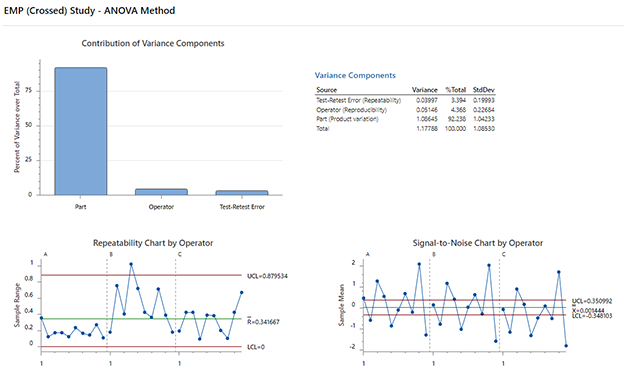
Create Gage R&R Study worksheet
Easily generate a data collection worksheet for your Gage R&R Studies.
Type 1 Gage Study
Evaluate the bias, repeatability, and capability of your measurement process on a single part.
Gage R&R: Probability of a False Answer
Examine the probability of passing a defective product (consumer’s risk) or of failing a good product (producer’s risk).
Acceptance Sampling
Examine either attribute or variables data to determine how many units to test before accepting or rejecting delivered material, and to create OC, AOQ and ATI curves.
Johnson Transformation
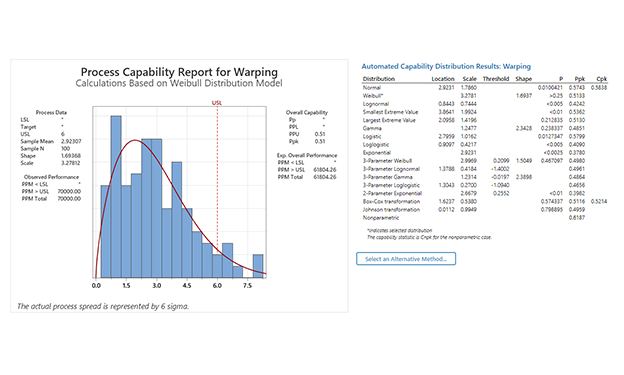
Perform a Johnson Transformation from directly within the Stat > Quality Tools > Individual Distribution ID Plot dialog and conveniently access all of the tools for handling non normal data from one location.
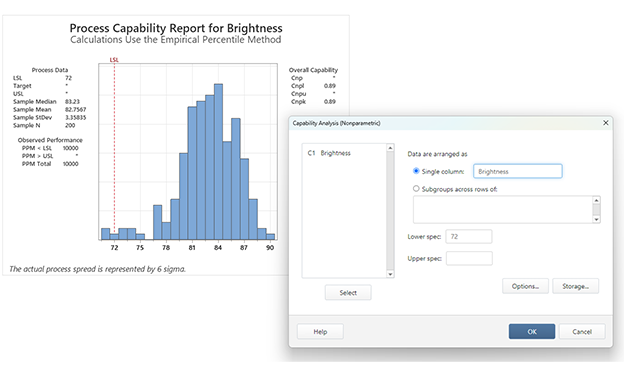
New Capability Analysis Options
Specify different unbiasing constant options for overall and within subgroup standard deviations.
Warranty Prediction
Forecast future warranty claims or returns based on current warranty data.
Warranty Data Pre-processor
Convert raw field data into the data format needed to run any life data analysis.
Cronbach’s Alpha
Measure the consistency or reliability of a set of items (in a survey or test) that assesses the same quality, skill, or characteristic.
Biplot for Principal Components and Factor Analyses
Use this new graph to display an overlay of the score and loading plots.
Power and Sample Size
Use new Power Curve graphs to examine the prospective sample space and choose the optimal sample size, with the desired power and detection goal.
Time Series
Use the improved Cross Correlation Function command to plot and store the cross correlations between two time series, which can be useful in determining if a series of data leads another series and by how many time periods, or lags.
Regression
Use the improved Make Indicator Variables command to more easily create indicator variables for regression analysis.
- More information in Help describing the methods and formulas used in Minitab’s statistical procedures.
- An expanded Glossary with more than 500 practical, easy-to-understand definitions.
- New and expanded data sets that provide all the data you need to practice the examples in Help.
- StatGuide, which explains and helps you interpret output, is now available for basic graphs.
Minitab Automation
Make Minitab the statistical engine behind all of your corporate applications. Use our COM objects to:
- Embed Minitab’s statistical analyses and graphs into your desktop applications.
- Deliver Minitab-validated output where and when you need it.
- Create regular Minitab reports from a database.
- Automatically perform Minitab analyses.
- Create and save Minitab worksheets.
- And more.
MyMenu
Add specialized functionality to the Minitab menu, including:
- Customized interfaces to corporate databases.
- Custom-created macros.
- Specialized reports.
- Automatically receive notifications for maintenance updates and install them as soon as they become available through Minitab’s update services.
- Opt to disable updates for multi-user licenses.